26 August 2018


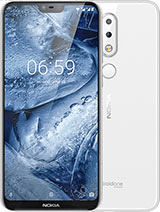
Nokia Brand Licencer HMD Global launched its new smartphone Nokia 6.1 Plus and Nokia 5.1 Plus in India on Tuesday. At an event held in New Delhi, the company raised curtains from both smartphones. Nokia 6.1 Plus is the global version of Nokia X6, launched in China. Both new Nokia smartphones have display designs like the iPad X. Nokia's two new smartphones have features such as Nano Painting Technology and Rear Gloss Finnish.
🌏Nokia 6.1 plus specifications🌎
All specifications in Nokia 6.1 Plus are similar to the Nokia X6. It has a 5.8-inch Full HD (1080 × 2280 pixels) display, which is equipped with 2.5 De Gorilla Glass 3. Knock on display and the aspect ratio of the screen is 19: 9. The phone has an octa-core Snapdragon 636 processor and 4 GB RAM. This Nokia smartphone has Nokia 6.1 Plus 64 GB inbuilt storage, which can be expanded up to 400 GB via microSD card.
Nokia 6.1 Plus comes with Dual SIM support and runs on Android 8.1 Oroo version. Nokia 6.1 Plus has 3060 mAh battery, as well as a 18-watt charger. The company claims that the battery of the phone will be charged 50% in 30 minutes and the Quick Charge 3.0 technology is supported. Smartphone has a 16 megapixel primary and 5-megapixel monochrome-equipped dual rear camera setup with Aperfar F / 2.0. Nokia 6.1 Plus has a 16-megapixel front camera with an aperture F / 2.0 for selfie and video calling.
For connectivity, Nokia 6.1 Plus has features like 4G VLTE, Wi-Fi 802.11 AC, Bluetooth 5.0, GPS / A-GPS, 3.5 mm audio jack and USB Type-C port. Accelerometer, ambient light sensor, digital compass, georoscope and proximity sensor are given in Nokia 6.1 Plus. The dimensions of the phone are 147.2 × 70.98 × 7.99 millimeters and weighing 151 grams.
🌎Nokia 5.1 plus specification🌎
It has 5.8-inch full HD + (1080 × 2280 pixels) display. Knock on display ...
Nokia 5.1 Plus has a dual-rear camera setup with a 13-megapixel primary and 5 megapixel secondary sensor. The camera comes with Bokeh Effect. The phone has an 8 megapixel front camera for selfie and video calling, which comes with AI Assistant Portrait Lighting Feature. Nokia 5.1 Plus runs on Android 8.1.0 operating system and is a part of the Android One program.
Prices and offers of Nokia 6.1 Plus and 5.1 Plus
Both smartphones will be found at nokia.com/phones and e-commerce website Flipkart. Nokia 6.1 Plus costs Rs. 15,999. The phone has started pre-booking from Tuesday and the first cell will be launched from August 30th. Nokia 5.1 Plus will be launched in September. The phone is priced at $ 199.
Photo Editor is a small but powerful photo editing application.
If you have some knowledge of photography, you can do a lot with Photo Editor.
Now use Photo Editor to edit photos on your mobile phone just like you would on a PC.
Features
Color : exposure, brightness, contrast, saturation, temperature, tint and hue
Curves & Levels : fine-tuning of colors
Effects : gamma correction, auto contrast, auto tone, vibrance, blur, sharpen, oil paint, sketch, black & white high contrast, sepia, and more
Adding text, images or shapes Frame, Denoise, Drawing, Pixel, Clone, Cut Out
Rotation, Straighten, Crop, Resize
Corrections : perspective, lens, red-eye, white balance and backlight Easily edit with the touch and pinch-to-zoom interface
Save images in JPEG, PNG, GIF, WebP and PDF
View, edit, or delete Metadata (EXIF, IPTC, XMP)
Save your final result to your gallery, as wallpaper, or on your SD card
Share photos with e-mail, SNS and more
Batch, Crop(Puzzle), Compress to ZIP, Create PDF, Animated GIF
Webpage Capture, Video Capture, PDF Capture(Lollipop+)
Ad-free option is available (Settings > Purchase Items)

These are 5 unique features of Whatsapp, which you may not have known yet
New Delhi: Everybody uses the world’s largest messaging app Whatsapp today. If you are one of them then this news is for you. Today we are going to tell about the five such features of Whatsapp, which you may hardly know about.
1. Before sending a message or photo to anyone on WhatsApp, you will see the right and edit option at the top. Just by doing this you can write anything on the photo and add emoji too.
2. On Whatsapp if you want to send someone a message in plain way and sending the message to bold or highlighted message. For this, after you type the message, you have to tap on it for a little while. After this you will get the option of cut, copy, share, bold and three dot. Of these, you can click on three dot in any format, according to your message.
Sponsored Ads
3. On Whatsapp you will often send emoji to people but do you know that you can send the same emoji to 6 different colors. For this, you must keep a tape for a while before sending any emoji, after which you will see the same emoji in many colors. Now you can send emoji to any color you like.
4. On Whatsapp if you want to save any message you can send a message to yourself. For this you have to create a WhatsApp group with a friend and then remove it from the group. In this way, only you will be saved in the group and will be able to message yourself.
5. If you want to keep a chat from a particular person saved, then you need to get help from Whatsapp’s Backup feature. For this, you go to Whatsapp settings and click chat and click on backup. After this, you will see the option of backup on e-mail, after which you can save that chat on e-mail.
New Delhi: Technology giant Google has announced a major announcement regarding its virtual Google Assistant in its Annual Conference. Under the scheme, Google will go ahead with machine learning and AI technology in the future. Which includes Google’s other product including Google Assistant. Soon, a special feature will be given in Google Assistant, which will talk to Google Phone on behalf of users via AI technology.
Duplex Technologies will be used
Google will use special technology for this, which is named Google Duplex. Through this technology the assistant will be made technically so capable that he can talk to himself on the phone of the person himself. In this, Google Assistant will be able to call himself and book the hotel or salon in place of the users.
10 best beautifull phone
Lumia 800 Today we have brought for you from the pages of the past who have set fire to the market with their beauty. Friends, today we are going to tell you about some such phones, even if they have not shown anything awesome in the market Phones have come into discussion due to their beauty.
double click Hindi me padhne ke liye
.
.Who does not know the Lumia 800, even if it is not made in the market, but this phone has made the coffee makers crazy because of its beauty. Here are some more phones that have warmed the market with their beauty –
Lumia 800
DyncaTAC 8000X
HTC Legend
Iphone 5
Shaomi m3
.
Samsung Galaxy S6 Edge
HTC One 8
Nokia 8800
Motorola Aura
Friends, tell which phone you feel more beautiful by saying. Share and follow.
double click to read in hindi

Redmi 6 Pro With 4000mAh Battery, 19:9 Display, Dual Rear Cameras Launched: Price, Specifications
A mutual fund is both an investment and an actual company. This may seem strange, but it is actually no different than how a share of APL is a representation of Apple, Inc. When an investor buys Apple stock, he is buying part ownership of the company and its assets. Similarly, a mutual fund investor is buying part ownership of the mutual fund company and its assets. The difference is Apple is inthe business of making smartphones and tablets, while a mutual fund company is in the business of making investments.Mutual funds pool money from the investing public and use that money to buy other securities, usually stocks and bonds. The value of the mutual fund company depends on the performance of the securities it decides to buy. So when you buy a shareof a mutual fund, you are actually buying the performance of its portfolio.
Mutual funds invest in stocks, but certain types also invest in government and corporate bonds. Stocks are subject to the whims of the market and thus offer a higher return potential than bonds, but they also present more risk. Bonds, by contrast, provide a fixed return that is usually much lower than what an investor gets from stocks. The advantage of bonds is they are low risk. Only in an extreme situation, such as the complete failure of acorporation, does an investor not receive the return he was promised from a bond security. A mutual fund's investment profile depends on the type of fund. There are three main types: equity funds, fixed-income funds and balanced funds.
A mutual fund is both an investment and an actual company. This may seem strange, but it is actually no different than how a share of APL is a representation of Apple, Inc. When an investor buys Apple stock, he is buying part ownership of the company and its assets. Similarly, a mutual fund investor is buying part ownership of the mutual fund company and its assets. The difference is Apple is inthe business of making smartphones and tablets, while a mutual fund company is in the business of making investments.Mutual funds pool money from the investing public and use that money to buy other securities, usually stocks and bonds. The value of the mutual fund company depends on the performance of the securities it decides to buy. So when you buy a shareof a mutual fund, you are actually buying the performance of its portfolio.
Mutual funds invest in stocks, but certain types also invest in government and corporate bonds. Stocks are subject to the whims of the market and thus offer a higher return potential than bonds, but they also present more risk. Bonds, by contrast, provide a fixed return that is usually much lower than what an investor gets from stocks. The advantage of bonds is they are low risk. Only in an extreme situation, such as the complete failure of acorporation, does an investor not receive the return he was promised from a bond security. A mutual fund's investment profile depends on the type of fund. There are three main types: equity funds, fixed-income funds and balanced funds.
This way you can check who is using your Aadhar Card
New Delhi: Do you know where your support number is being used? Maybe you do not even remember how often you …
Where did he give his photocopies or his place of support? But you can find out where the support number is being used …
You can also know that there is no misuse of your support number and you are not able to. In no place, your support is not being used, which informs you …
Sponsored Ads
Unique Identification Authority of India (UIDAI) has given it the facility to check it. This Authority manages your support. If you want to check your base, then you …
Go to 1 Support Orientation History page. Here’s a link- https://resident.uidai.gov.in Here below, you will see Aadhaar Authentication History written below. Click on this link ….
Come to leave Facebook and WhatsApp, Google SMS, Learn what are FEATURES
New Delhi: Today is the era of social media in which people take messages like social media like WhatsApp and Facebook to send messages, but if you have been using a smartphone for a long time, you would know that by coming to these social apps Earlier, people used to send SMS to send messages, which is no longer, but now you will soon be able to send SMS from your desktop and laptop like that of mobile.
In fact Google has officially released an Android message for the web, with the help of which you can easily send an SMS from your computer. According to the latest information, you will now be able to receive RCS, SMS Send and Receive from your desktop. Let’s say that this feature of Google has just been released, so by next week this feature will be available to the users.
Google announced on Monday that ‘Message for Web’ is a new feature of Android messages. In this feature, users will get web version text, pictures and sticker support, along with the option of messaging like WhatsApp and Facebook. Let’s say that after this new feature of Google, there has now been a collision for WhatsApp and Facebook.
To use this app, users will have to install the latest version of the Android Messages App, then you will get this new feature. For this you have to open an Android Message site in your laptop or computer, but here you will get QR code like WhatsApp which you can connect to your phone and computer after scanning. Now after the arrival of this app, users will be able to send SMS to each other and connect with each other.